A karaoke microphone that suddenly produces a loud, sharp squeal can ruin an otherwise enjoyable singing session. This sound is known as microphone feedback, acoustic feedback, or microphone howling. It often happens when the microphone picks up sound coming from the speakers, sends that signal back through the amplifier, and repeats the cycle until a particular frequency becomes extremely loud.
Why does a karaoke setup howl? The most common reason is that the microphone is receiving too much sound from the speakers. A microphone placed too close to a speaker, pointed toward a speaker, or used with excessive microphone gain can trigger feedback. Room reflections, excessive equalization, and strong reverb can make the problem worse.
The good news is that microphone feedback can usually be reduced through better speaker and microphone placement, sensible gain settings, and proper DSP feedback suppression. For a more integrated solution, Tonewinner's karaoke and home theater products include models with dedicated karaoke processing features, such as the Tonewinner YX-03 home theater and karaoke system and the AT-2000 Dolby Atmos and karaoke AV receiver.
Quick answer: To stop karaoke microphone feedback, move the microphone farther from the speakers, keep it behind the main speaker line when possible, avoid pointing it toward a speaker, reduce microphone gain, and adjust excessive EQ or reverb. If your system includes DSP howling suppression or feedback control, use it after correcting the physical setup and basic gain levels.
Microphone feedback is a repeating audio loop between a microphone, an amplifier, and a loudspeaker. The microphone captures sound from the room, including sound reproduced by the speakers. That signal is amplified and played through the speakers again. The microphone picks it up once more, creating a loop.
When the loop has enough gain at a particular frequency, that frequency becomes increasingly loud. The result is the familiar high-pitched squeal or ringing sound often heard in karaoke rooms, home entertainment spaces, meeting rooms, and live performances.
The feedback loop can be understood in a simple signal path:
Microphone → Karaoke DSP / Amplifier → Speaker → Room sound → Microphone
When the loop gain becomes too high at a frequency, feedback starts.
Feedback is not necessarily a sign that a microphone or amplifier is defective. Even professional audio equipment can produce feedback if the microphone, speakers, room, and gain settings are not properly matched.
It is also useful to distinguish feedback from other noises. A steady low-frequency hum may come from grounding or electrical interference. Crackling may indicate a cable or connector issue. A sudden high-pitched tone that changes when you move the microphone is more likely to be acoustic feedback.
In most home karaoke systems, feedback is caused by a combination of room acoustics, microphone placement, speaker direction, and excessive signal gain. Check these factors before changing advanced DSP settings.
Microphone too close to the speakers
When a microphone is positioned close to a loudspeaker, it receives a stronger amount of the speaker's output. This increases the chance of creating a feedback loop. The problem can become more noticeable when the microphone is held directly in front of a speaker cabinet.
Microphone pointed toward a speaker
Microphone direction matters. Many handheld microphones are more sensitive at the front than at the rear. If the microphone's pickup area faces a loudspeaker, it may capture more of the amplified sound. Turning the microphone away from the speaker can reduce the amount of sound entering the feedback loop.
Microphone gain or volume is too high
High microphone gain increases the microphone signal before it reaches the rest of the audio system. If the gain is excessive, even a small amount of sound coming from the speakers can become enough to trigger feedback. Raising the master volume to compensate for poor microphone settings can make the situation worse.
Excessive treble or microphone EQ boost
Feedback often occurs at particular frequencies rather than across the entire audio spectrum. Boosting certain microphone EQ bands can increase the level of those frequencies and make feedback more likely. A sharp ringing tone may indicate that one frequency range is receiving too much gain.
Too much echo or reverberation
Karaoke effects such as echo and reverb can make vocals sound fuller and more spacious. However, excessive effects can increase the amount of microphone-related sound circulating through the system. If feedback appears after adding more echo, try reducing the effect level first.
Strong room reflections
Hard walls, glass, bare floors, and other reflective surfaces can send sound back toward the microphone. A room with strong reflections may be more difficult to control than a room with softer furnishings and better acoustic treatment.
The most effective approach is to work from the physical setup toward the electronic settings. Do not immediately turn on every feedback-control feature or make large EQ changes. Start with the easiest adjustments and test the system at a moderate volume.
Move the microphone away from the speakers. Increase the distance between the microphone and the loudspeakers whenever possible. Avoid standing directly beside a speaker cabinet while singing.
Keep the microphone behind the main speaker line. In a typical front-facing karaoke setup, position the speakers in front of the singer and the microphone behind the speaker line. This helps reduce the amount of direct speaker sound entering the microphone.
Point the microphone away from the speakers. Avoid aiming the microphone's pickup end toward the speaker. If the microphone has a directional pickup pattern, use that pattern to your advantage.
Reduce microphone gain gradually. Lower the microphone input gain or channel volume until the feedback stops. Then raise the level carefully to find a practical operating point. Avoid compensating for a low microphone signal by turning the master volume excessively high.
Reduce unnecessary EQ boosts. If feedback occurs at a particular pitch, inspect the microphone EQ. Reduce the problematic frequency range rather than cutting every frequency. Narrow, controlled adjustments are generally more useful than large changes across the entire EQ curve.
Lower echo and reverb if necessary. If the system starts howling after increasing vocal effects, reduce the effect level and test again. A clear vocal signal is more important than excessive effects.
Check the microphone and cables. Inspect connectors, cable condition, wireless receiver placement, and battery condition. These checks may not solve acoustic feedback directly, but they can help rule out other audio problems that sound similar.
Practical troubleshooting order: Lower the volume first, reposition the microphone and speakers, reduce microphone gain, adjust EQ, reduce reverb, and then use DSP feedback suppression if available. Make one change at a time so you can identify what actually improves the system.
Digital Signal Processing (DSP) feedback suppression is designed to help control the frequencies that cause microphone howling. Depending on the product and algorithm, a DSP system may detect feedback-prone frequencies and apply frequency shifting, filtering, or other processing to reduce the unwanted tone.
Some karaoke processors use automatic feedback detection, while others provide adjustable feedback suppression levels or frequency-shift settings. These functions can help users achieve a more stable microphone sound without relying entirely on manual EQ adjustments.
However, DSP feedback suppression should not be treated as a replacement for correct microphone placement and gain structure. If a microphone is pointed directly at a speaker and the system is operating at an excessive level, the feedback-control system may not be able to compensate for every situation.
For a home karaoke system, a useful DSP feature set may include:
These controls allow users to adjust the microphone sound more precisely. They are especially useful when a karaoke system is used by several people or in a room where the speaker and microphone positions cannot be changed easily.
For users looking for a home entertainment system that combines karaoke and immersive home theater, the Tonewinner YX-03 is a relevant model to consider. It is a 5.1.2 home theater and karaoke system designed for modern living rooms, combining an amplifier with main, center, and surround speakers.
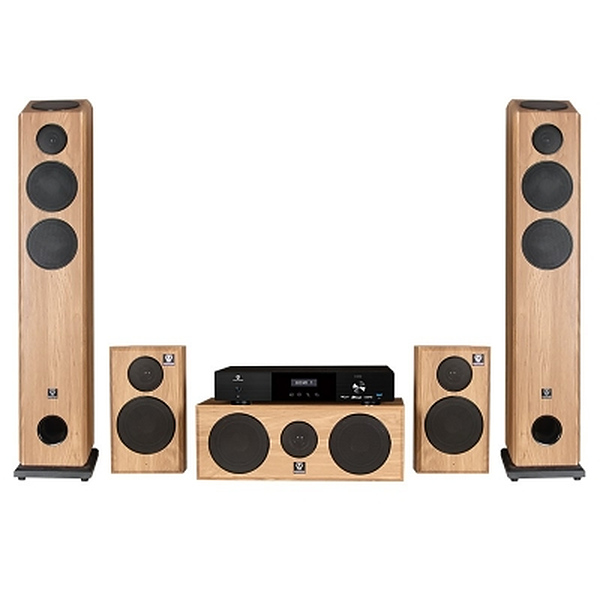
Tonewinner YX-03 5.1.2 home theater and karaoke system
One of the YX-03's relevant features for karaoke users is its professional DSP digital effects processor. The official product information lists the following functions:
These functions address several common karaoke requirements. Feedback suppression helps manage unwanted microphone howling, while parametric EQ gives users more control over vocal frequency balance. The microphone effects provide different vocal styles for different preferences.
The YX-03 also combines karaoke with Dolby Atmos and DTS:X home theater playback. Its product page describes a multi-channel system with an amplifier and matching speakers, as well as mobile app control and local music playback through USB and TF card storage.
For families who want both movie playback and karaoke in one living-room system, the YX-03 provides a more integrated approach than assembling unrelated components separately. You can find the complete specifications on the Tonewinner YX-03 product page.
Another option for a more configurable home theater and karaoke setup is the Tonewinner AT-2000. It is an 11-channel integrated AV receiver with 7.2.4-channel Dolby Atmos and DTS:X decoding, designed to support home cinema and karaoke entertainment.
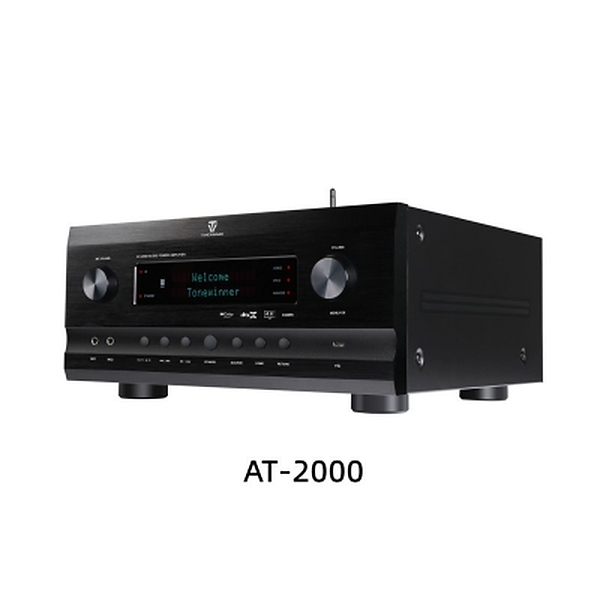
Tonewinner AT-2000 home theater and karaoke AV receiver
The AT-2000's official product information lists DSP karaoke effect processing and anti-howling functionality. It also supports microphone app control, separate karaoke sound-effect settings, and a one-button switch between theater and karaoke modes.
For users who want a multi-channel system rather than a simple two-channel karaoke amplifier, the AT-2000 offers a wider home theater configuration. Its product specifications list 7.2.4-channel decoding and 11 channels of amplification, with a rated output of 160W per channel at 8 ohms under the stated one-channel-driven, 1kHz, THD=1% condition.
The AT-2000 also includes automatic room EQ calibration. This is intended for measuring and adjusting the loudspeaker system and room response. It is important to understand that room calibration and microphone feedback suppression are different functions: room EQ helps optimize playback across the listening area, while karaoke anti-howling processing addresses microphone feedback.
If you are planning a home cinema system that also supports karaoke, explore the Tonewinner AT-2000 AV receiver for its complete input, output, and karaoke feature details.
These two functions are sometimes confused because both involve audio processing and frequency adjustment. However, they solve different problems.
| Function | Main Purpose | Typical Application |
|---|---|---|
| Feedback suppression | Reduce feedback-prone tones in the microphone signal path. | Karaoke and live microphone use. |
| Room EQ calibration | Measure and adjust loudspeaker response to account for room acoustics. | Home theater and multi-channel speaker setup. |
| Microphone parametric EQ | Adjust selected frequency ranges in the vocal signal. | Vocal tone shaping and targeted feedback control. |
| Echo and reverb processing | Add ambience and vocal effects. | Karaoke vocal presentation. |
A system may include several of these functions, but they should be adjusted for their intended purpose. Running automatic room calibration does not automatically guarantee that microphone feedback will disappear. Similarly, feedback suppression does not replace proper speaker distance, placement, or room correction.
For a broader look at Tonewinner's home cinema and karaoke equipment, visit the Tonewinner AV Series product range.
A stable karaoke system starts with a sensible physical layout. Even a processor with feedback suppression works better when the microphone and speakers are positioned correctly.
Place the speakers in front of the singing area. For a typical front-facing arrangement, the main speakers should be positioned ahead of the singer. Avoid placing a loudspeaker directly behind the singer if the microphone can easily pick up its output.
Keep the microphone away from the speaker cabinets. The singer should have enough space to move without bringing the microphone close to the loudspeakers. If the room is small, carefully adjust the speaker direction and microphone position.
Start with moderate microphone and music levels. Set the music volume and microphone volume separately. Increase the microphone level gradually while someone speaks or sings into the microphone at a normal distance.
Set vocal effects after the basic level is stable. Begin with modest echo and reverb. Once the system is stable, add effects gradually until the vocal sound is comfortable.
Save a stable preset if your equipment supports it. If the system is used regularly, save the microphone EQ, volume, and effect settings after testing. This helps avoid repeating the entire setup process every time you use karaoke.
Test with the room in its normal condition. Doors, curtains, furniture, and the number of people in the room can affect sound reflections. Test the setup in the conditions in which it will usually be used.
If you only experience occasional feedback, microphone repositioning and basic gain adjustments may be enough. However, if several people use the system, the room layout is fixed, or feedback happens frequently, a karaoke system with built-in DSP features can make operation easier.
Look for equipment that provides clear control over microphone volume, EQ, feedback suppression, and vocal effects. A system with independent microphone processing is especially useful because it allows you to adjust vocal sound without making unnecessary changes to the music signal.
The Tonewinner YX-03 is a suitable integrated home entertainment option for users who want intelligent feedback suppression and karaoke vocal processing together with a 5.1.2 home theater system. The AT-2000 is another choice for users who prefer a more configurable multi-channel AV receiver with built-in karaoke processing and anti-howling features.
When comparing products, check the actual microphone inputs, supported speaker configuration, DSP functions, and room requirements. Do not choose a system based only on its total amplifier power. A higher power rating does not, by itself, prevent microphone feedback.
Microphone feedback is usually caused by an audio loop between the microphone and speakers. The most reliable way to reduce it is to manage the entire signal chain: position the microphone correctly, keep speakers in front of the singing area, control microphone gain, avoid excessive EQ boosts, and use vocal effects carefully.
DSP feedback suppression can provide another layer of control, especially in karaoke systems that are used frequently or by different singers. Tonewinner's YX-03 combines intelligent feedback suppression with parametric EQ and microphone effects in a home theater and karaoke system. The AT-2000 offers DSP karaoke processing and anti-howling functionality in a multi-channel AV receiver.
A good karaoke setup should make singing easier, not force you to fight against feedback. Start with the room and microphone placement, set sensible levels, and choose equipment with the processing features that match the way you use your system.
Why does my karaoke microphone make a high-pitched squealing sound?
The sound is usually acoustic feedback. The microphone picks up sound from the speakers, the amplifier increases that signal, and the speakers reproduce it again. When the loop gain becomes too high at a particular frequency, a loud squeal or ringing tone occurs.
How do I stop my karaoke microphone from howling?
Move the microphone farther from the speakers, keep it behind the main speaker line when possible, point it away from the speakers, and reduce microphone gain. If necessary, adjust microphone EQ and reduce excessive echo or reverb. Use DSP feedback suppression if your karaoke equipment supports it.
Should karaoke speakers be in front of or behind the microphone?
In a typical front-facing karaoke setup, place the speakers in front of the singing area and keep the microphone behind the speaker line. This helps reduce the amount of direct speaker sound entering the microphone.
Does turning down microphone volume stop feedback?
It often helps because reducing microphone gain lowers the signal level in the feedback loop. However, microphone volume is only one factor. Speaker placement, microphone direction, EQ, room reflections, and effect levels also influence feedback.
What is DSP feedback suppression in a karaoke amplifier?
DSP feedback suppression is digital processing designed to reduce frequencies that cause microphone howling. Depending on the system, it may use frequency shifting, filtering, or automatic feedback detection and control. It works best together with proper microphone placement and gain settings.
Can too much echo cause microphone feedback?
Excessive echo or reverberation can make feedback more likely by increasing the amount of processed microphone sound in the system. If howling begins after increasing vocal effects, reduce echo and reverb and test again.
Does room EQ calibration prevent microphone feedback?
Not necessarily. Room EQ calibration adjusts loudspeaker response to account for room acoustics. Microphone feedback suppression is a different function that targets unwanted feedback in the microphone signal path. A system may offer both, but one does not automatically replace the other.
Does the Tonewinner YX-03 have microphone feedback suppression?
Yes. The Tonewinner YX-03 product information lists intelligent feedback suppression as part of its professional DSP digital effects processor. It also includes parametric EQ adjustment, vocal beautification, and 15 microphone sound effects.
Does the Tonewinner AT-2000 support karaoke anti-howling?
Yes. The AT-2000 product information lists DSP karaoke effect processing and anti-howling functionality. It also supports separate karaoke sound-effect settings and a one-click theater and karaoke mode switch.
Is a more powerful karaoke amplifier less likely to produce feedback?
No. Amplifier power alone does not prevent feedback. Feedback depends on the microphone and speaker positions, microphone sensitivity, gain structure, room acoustics, EQ, and signal processing. A suitable feedback-control system and correct setup are more important than choosing an amplifier based only on its power rating.
What should I check first if my karaoke system suddenly starts howling?
Lower the volume, move the microphone away from the speakers, check its direction, and reduce microphone gain. Then inspect EQ and vocal effects. If the problem continues, check the DSP feedback suppression settings and the physical room layout.
Tel : +86 020 3479 6146
Tel : +86 020 3479 7660
WhatsApp : +86 15812388120
E-mail : simi@tonewinner.com
Adres zamieszkania : Building 2, No.1, Hongsheng 3 Road Dashi Street, Panyu District Guangzhou, 511430 China
© 2026 Guangzhou Tonewinner Electronics Co., Ltd
Mapa strony | XML | Polityka prywatności |